shazbot
- 3 Posts
- 89 Comments
If using KES, check
General > Add mail iconto append an icon/label next to a username to directly message them. (If on the same intance as you)
 2·2 years ago
I had just forgotten something simple (unload the threaded comments CSS):
Before:
removeDangling();
safeGM("removeStyle", "hide-defaults");
After:
removeDangling();
clearMores();
safeGM("removeStyle", "hide-defaults");
safeGM("removeStyle", "threaded-comments");
This is live on testing, but might take a sec to propagate due to GitHub’s caching feature.
You’re right, looks like I missed something that was obscured by custom styling.
And good catch on the mores appearing on teardown. This mod is turning out to be quite a beast. Thanks for testing.
I have resolved the aforementioned issues with a hotfix on the testing branch; please test when time permits. Executive summary:
- The mod fully restores the DOM tree to its original state when toggled off. It is now possible to toggle the mod on and off on the same page without reloading, and changes will behave as expected.
- For reasons of security, the mod no longer allows clicking the post headers or post body as a means of collapsing/expanding comments. This was attaching unnecessary listeners to elements on the page, with no way of clearing them when toggled off (besides hard refreshing). Now the only approved way of expanding/collapsing is to use the +/- icon or colored bars.
- The mod erroneously modified the CSS of profile pictures to give them rounded borders, which was unspecified by its intended behavior and documented nowhere in the description. Now they conform to the standard square format.
- The superfluous
mores are being removed now for comments with overflow text. What I thought would be a quick fix turned into hours, and I thought I was losing my marbles over this one for a long time, since the tree clearly showed numerous duplicatemores, but only one per comment was being shown at runtime of the script. At first, I did not seriously think that the mod was completing its runtime cycle prior to the duplicate mores being spawned, but indeed this is what was happening. For now, I have added a 20ms sleep before clearing the extramores, and this seems to suffice to let them propagate before the mod can continue with the cleanup phase. This seems satisfactory for now, short of attaching observers to wait for the duplicatemores to appear.
I believe that covers everything. It should be possible to switch the mod on and off at will now and see no adverse effect.
I have completed an audit of the mod and observed the following issues:
-
Does not properly unset classes and restore the page to an intact state when turned off: this was having the side effect of making the threaded lines look incorrect when toggling on/off in place. The mod should not leave dangling containers around after it is toggled off. The mod creates an outer container so that the “expando” lines flow all the way down through the child elements, but when turned off, these child elements need to be moved back out of the container to be adjacent to each other and the container removed. => Fixed locally.
-
Does not properly unset event listeners attached to nested comments. Same as above, tends to leave dangling listeners and does not unset itself cleanly. => In progress.
-
Because it physically manipulates the DOM and moves sub-comments into their own container down the tree, triggers an event (likely a bug) on Kbin’s side whereby any time the DOM is updated for that element, Kbin appends a
moreelement (text expansion button) if the text overflows a certain length, even if amoreelement is already present. You can test this by creating a dummy div above or below a long comment and then moving the long comment before or after that div. Simply moving its position in the DOM will trigger the creation of anothermoreelement inside. And because the mod puts each comment into its own container for the purposes of threading nested chains of comments, this will trigger the creation of as manymores as there are indendation levels. So for a comment chain 5 replies deep, there will be 5mores. This is further exacerbated when toggling the mod on and off, since thesemores are not getting wiped and will just keep getting stacked up. Since this is also an upstream issue, our only alternative here is to walk through the tree and remove the extraneousmoreelements after nesting occurs. This is similar to your CSS solution, but instead of masking them, physically deletes them, otherwise we will have a constantly growing tree ofmores every time nesting happens. I guess this should also be reported upstream as well. Kbin seems to expect no DOM manipulation to occur, which is reasonable, I suppose, but might be better if the callback doesn’t insert themoreelement at all if it’s already present. => Easy fix on the Kbin side, in progress.
-
I understand the root cause now, will ping you again once this feature is working as expected.
Thanks for looking into this. I’ve been meaning to audit this mod, but was a bit busy this week. In light of this report, this seems like as good a time as any.
Unfortunately, the mod is no longer maintained by the original author, so I’ll have to inherit it and refactor it. I feel it is overengineered for what it attempts to do, so it should be streamlined and the aforementioned issues fixed. I am also aware of the issue that the mod fails to unset itself properly when turned off. I am really not satisfied with its current functionality.
Root cause analysis and solutions are described in a subsequent comment
I wasn’t able to reproduce the issue on a default kbin setup with KES either on off. The “always expand post bodies” feature of KES only applies to bodies, but I could extend it to support comments as well so that they auto-expand. What I didn’t observe was any situations where the expansion bar obscures the text. Do you have a screenshot of that?
Are you running a custom theme?
New KES mod?
Hello, I have added this feature to KES (third party extension) today. I believe it is working correctly based on your requirements:
- Show an icon next to magazine names on the main thread index (https://kbin.social or https://kbin.social/sub if logged in). Click this icon to “softblock” threads from that magazine from appearing on your main thread index. This does not block the magazine outright: you can still go to the magazine directly, so it is less aggressive than a total block.
- Show a Softblock/Unsoftblock button in the sidebar of magazines, as well as in the Magazines index located at https://kbin.social/magazines. As you would expect, this button has the effect of adding/removing a magazine from your filters.
- Show a tab at the top of the Magazines index that you can use to centrally manage your softblocked magazines. For the time being, this is merely informational.
Full details can be found in the release notes here over at /m/enhancement.
Let me know if this gives you the functionality you wanted.
Hi, this feature is still available and working in KES under
Threads > Permanently Hide Posts. The hide link appears next to the more button, not inside of the more menu. Give it a try.
If you are using KES, you can navigate to
Threads > Permanently hide poststo enable the option to hide threads from your feed
If you install KES and navigate to the setting
Threads > Rearrange post order, you can dynamically change the position of the OP, the comments, the add comment box, and other elements and choose which place you want them to be in descending order. You can direct other questions to our magazine on /m/enhancement as well.
Good catch, it seems that if there are multiple pages of comments, it won’t take you there because of the pagination.
I used to have this issue, but I don’t have it anymore. Notifications jump to where they should; the links point to specific comment IDs within a thread. Can you list steps to reproduce it? What do your notification links look like?
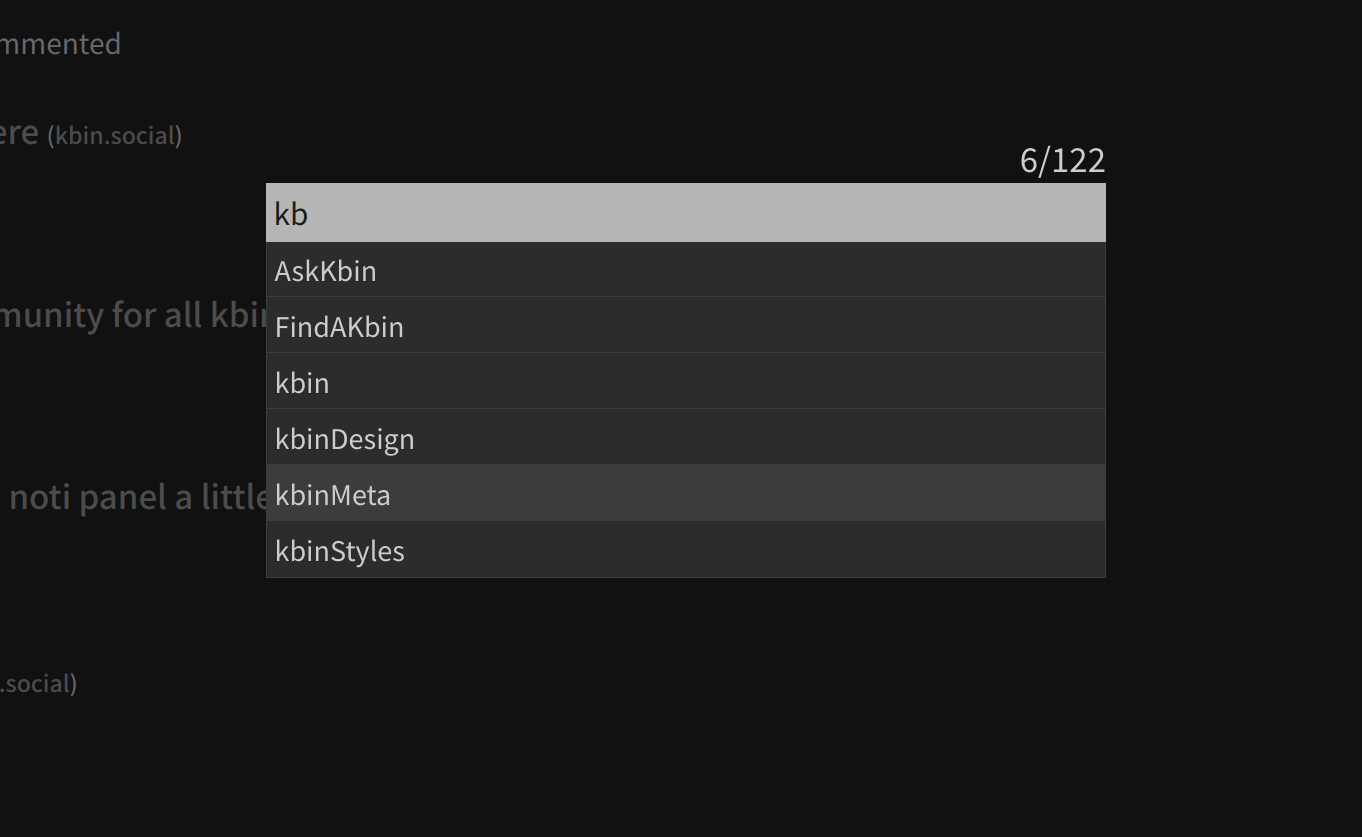
Please have a look at KES. The latest version, released today, includes a featured called the “subscriptions omnibar” that allows you to summon a searchable, filterable list of your subscriptions at a keypress and jump to one. This feature is detailed in this thread and looks like this
As promised, I have added something called the subscriptions omnibar to the latest version of KES that allows you to open a list of your magazines at a keypress and search/filter through them, then jump to one instantly. Details are here
This is now live in 2.2.0, see here
I have filed your suggestion here


A bit late, but I saw your post and decided to make a tool for this. Hope this helps.