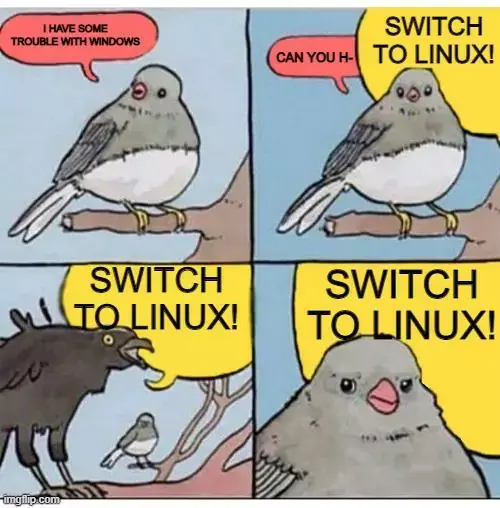

“Okay, I switched to Linux, now I’m getting this error message: _______.”
“Install ______.”
“It gives me this error now: ______.”
“You have to update the _____ library first.”
“It won’t let me.”
“You have to use sudo.”
“It tells me to clone the git via the command line, but git says verifying login from command line isn’t supported any more.”
“You’re following seven year old instructions.”
“They’re the only instructions I can find.”
“You should switch to this other flavor of Linux.”
I do not prefer apt-based systems, but I’ve installed variations of Ubuntu (e.g. Mint) on systems for geriatric (grand)parents in the past 5 years and have not yet needed to drop into shell to fix something.
If the needs are basic (browsing, email, printing, documents), Linux hasn’t needed wizardry for years. This is mostly thanks to Gnome and KDE’s hard work on GUI admin tools, but if someone is going directly from Windows to i3, they’ve chosen a steep hill to climb.
TIHI
I remember I had a date with a girl back in the’10s. We hit it off and got back to her place. Wanted to show her a funny Internet video.
She brought out an ancient laptop that refused to boot and said her Ex had tried to fix it with Linux.
I got it pointed at the right dependencies, she fellated me as it updated.
I think this is my only sexy story that includes Linux.
Well, I guess there was this one time I loaned a lonely neighbor DOS 6 disks.
But, that does not include Linux.
My suspicion is it’s not just your sexy Linux story but the only sexy Linux story.
I mean we all know that recompiling the kernel is practically a replacement for sex
Never been to PenguiCon, I guess.
Is that the furry Linux con?
This is the best blowjob story I’ve read yet lol
Switch to Linux and spend way more time making sure everything is updated and having to jump through hoops installing things.
Switch to Linux! Then you can have problems with Linux.
The ones that make me laugh uncontrollably are those Windows disk encryption issues for which the solution is…wait for it… run Linux from a LiveISO, fix the disk with Linux, then reinstall Windows. Because Windows is incapable of fixing its own issues that it itself caused.
No, you don’t say “switch to Linux”. This is an opportunity to be free from the shackles of being the go-to IT support person! If they say they are having computer problems, ask “Is it Linux? No? Sorry, can’t help you”
About the same when you ask for a good GUI replacement for X and someone replies “just use the command line”, like cheers for that men, not what I’m asking for.
50% of the time the Microsoft forum help solution for any Windows problem is “Have you tried Re-installing Windows?”
- source, my ass
A non-technical end-user once had a problem with Windows. A technical friend said “SWITCH TO LINUX”. Now they have thousands of problems.
I’ve been a non-stop user of Linux as my primary OS since before Ubuntu was a thing. I do not recommend Linux systems to my non-technical friends.
My Aunt bought a new laptop to run her eBay/Facebook selling business on. She’s not particularly techy but has used Windows machines for admin work for prob 20 years or so. Laptop had no office apps installed and she tracks everything in a spreadsheet. Original plan was to install Libreoffice but it was running some budget version of Windows 10 you can’t install anything on, can’t remember what it’s called. So I installed Fedora. Chromium and Libreoffice Calc open on login, her ancient HP printer works, she’s able to access her camera as USB mass storage when she lists items and unattended upgrades are enabled. That was 2 years ago, no problems since.
Cool story, bro. And for every such cool story you can bring up I can bring you a hundred, probably, of people who got set up on Linux and returned to Windows because it was a horror show from their perspective.
Let me give you the clue: “The Year of the Linux Desktop” has been declared with monotonous regularity since the 1990s. It still hasn’t arrived. There’s a reason for this, and the quicker Linux (and other F/OSS) advocates grasp why this is, the quicker will the year actually arrive.
Until then, Linux is a fringe OS for techies. (And there it excels. As I said, I’ve been a non-stop user of it for ages.)
I totally agree that can happen. My first experience with Linux was installing Slackware from a CD I got with a magazine at 16. Install worked but I couldn’t really do much with it with no internet connection so abandoned it. Also I hosed the Windows partition when trying to set up dual boot so got banned from the family PC for a while.
Mind clarifying?
All you have to do is turn that off and you can install anything you want. You took a simple problem and made it hard.
I don’t know how this solution should be hard. I always have a live boot usb(O.K. not Fedora) with me and installing these apps is about 1-2 commands and I really don’t like scrolling through legacy Gui apps.
It sounds like they’re talking about the N versions of Windows, which can only install apps through the Microsoft Store. That can be disabled, but my understanding is it’s a pain to get it done. It’s meant to be locked down kind of like Apple products.
It’s S mode and it’s just a couple buttons.
Windows S can be turned off, but it does require an internet connection.
I installed Linux to my tech illiterate parents. They are doing fine. No issues in years.
They probably stopped asking you for help and just used their phones.
My dad thought the XFCE-Materia-Theme is the occasional Windows redesign until i told him.
And last month he wanted his antivirus back, even though i explained it already. But he’s good at other things.
I love XFCE because of its retro 90s Win98 look!
I mean, that’s what themes are for. Just adapt it to your liking.
There is fine line with being tech illiterate and being able to use linux when it all just works. The problems arise only when you are just slightly more advanced and want to do something weird without actually being able do it in linux with some things being a bit too much for the average Joe.
The only thing people like my parents need is a functioning browser. I bet %95 of all Windows/Mac users are similar.
Yeah that is not true. Microsoft Office is one super commonly used thing, and that doesn’t work on Linux.
And before you say, yes there are alternatives to Office. The point is most people definitely need more than a web browser.
Yeah correction, people think Chromium is enough until it’s not
Microsoft Office works in the browser.
It’s shit, I’ve tried it, so many features missing.
I tried to install I think Ubuntu for my parents. I failed to find a way to properly allow short/simple passwords after like 2 hours of fiddling with configs. Gave up on it after that.
You shouldn’t be allowing that to be honest. You also shouldn’t be using Ubuntu especially for new users.
Well, its between allowing that and not using Linux at all so that is that. If I could get them to remeber a strong password, it would not be for PC login.
What distro would you recommend? I was under the impression Ubuntu was furthest with UIs.
I would recomment Mint to users who use their Computer for more than just Webbrowsing. If its just webbrowsing and you know Linux, try setting up Fedora silverblue. In my vm’s two digit passwords work.
Ubuntu has turned to garbage in recent years because of canonical. It also looks more like mac than Windows.
Try Linux Mint.
Hmmm, I had mint for a little bit once. I don’t remember having any issues with it which probably means it is good. Paradoxically it also made me forget about it somewhat.
But I really have an urge to try NixOS for myself… And I don’t really want to mess with my parents setup now.
Yeah I can understand not wanting to mess with something that works
I don’t know if something changed but you can use even 4 digits now.
I’ve found that OpenSuse Tumbleweed is better than both Ubuntu and Linux Mint.
They set out to make a distro that is kept up to date perpetually instead of managing different versions.
deleted by creator
You gave Ubuntu to your grandmother and she fucking died?
OMG, Linux kills grandmothers!(I know, I quit Windows around 95, it’s just that I couldn’t resist)
Have you tried turning it off and back on?
I don’t because I don’t wanna be that guy.
But in general these days, I’d absolutely recommend it. Anything in the debian family is just as easy to use as windows. As long as you hook them up with some good cron jobs for auto updates and rollbacks on failures and stuff, they’ll be right as rain.
To be clear, I wouldn’t have in like 2015.
As long as the distro is stable anyone can use it to use a browser and browse the internet. I had put Ubuntu Linux for my mom on a laptop, back in 2010, she was using just the browser. She had it for 2 years, no problems. She did nothing else with that laptop though, because that was the first time she was using a computer. She was mostly facebooking.
Exactly. My parents have been using Linux for years, they have no technical expertise, and most of the time they don’t need it. For the average user, I find linux more stable than windows.
ngl, the “switch to linux” crowd is close to a vibe of complaining that “my car is making some weird sounds” and the response is to “buy a new car!” I mean, it would solve the problem of not having that issue with windows/your car, but it also means you have to intrusively replace your workflow and probably find some entirely new programs to do what you already could, and potentially have many new, less explicable problems, just to not have that one tiny problem that you could live around.
Often it’s worse. It like telling people to move to a different country because the roads are better there.
As a petrol head, that is a very convincing argument to move.
“My ISP, the only ISP available where I live, is terrible and unreliable.”
“You should move.”
That’s the “switch to Linux” energy in a nutshell.
Yeah nah I think of it kinda like the whole custom ROMs thing for Android. Most people could care less until performance drops to the degree that they have to switch over
Car is making some weird sounds -> you slipped a bearing, your head gasket is blown, or something else catastrophic, because you bought a Ford/Kia/etc. -> buy a new car
Ehh
More like someone saying
“Then change the station”
When someone complains
“I don’t like the ads on this radio station that I listen to in my car on the drive home”
There’s no financial loss by doing so, it’s relatively easy, just have to find out which frequency another broadcast you like is playing on
But the other radio doesn’t play the vital radio show you need for work.
Yes but I don’t want to listen to country.
You know, I can’t remember the last time that changing the station on my radio required me to sift through thousands of subtly out of date web pages to find clues as to why I just can’t hear that one guitar riff.
deleted by creator
depends how much you value your time. if you’ve nothing to do or just like fucking about with your os in your spare time then sure, linux is free. if you’re, say, a freelance graphic designer and actively losing money whilst trying to learn the foibles of a new os, and just fixing the bullshit that win & mac do by default; then it’s decidedly not
deleted by creator
my dude, i haven’t booted into windows in ages. but that proves my exact point: it might save one time if ones workflow involves a lot of tasks that can be scripted. if ones workflow is “launch photoshop; browse the web for inspiration; draw for a bit; close photoshop.”, it won’t save any time. especially due to the hassle of getting photoshop working, or learning a new app like gimp or krita.
launch photoshop; browse the web for inspiration; draw for a bit; close photoshop
hAvE yOu tRiEd GiMp?
- average Linux fanboy. Thank you for not being one of those!
Oh man, that reminds me of the one time I promised a friend to make a poster for an event and my windows lappy died the next day. I had to shoehorn the project into gimp on my tiny netbook.
It was painful. I’m glad for knowing how to use gimp in a pinch, and it is quite powerful software, but it felt like every tool and setting was in the wrong place after working with PS for so long.
Also, it goes without saying that designing a full sized poster on a 10" screen is a fools errand.
to be fair, i actually prefer gimp. but i recognise that different things work for different people, and often it’s not worth learning new software unless it brings significant advantages
“I prefer xxx” won’t work in corporate environments though, that’s the problem.
deleted by creator
Dude, if this is about the windows tablets, newsflash, they suck.
it, er, isn’t, i’ve never used one so can’t comment, and also i don’t understand how you got that impression?
Linux is free if you don’t value your time.
To be fair Windows often loves to throw rocks under your feet.
deleted by creator
Linux is free, if you can be bothered learning how to drive again. It’s like driving a manual when everyone else has an auto
I love Linux, but it’s my job. When I go home I just want the simplicity of Windows. Thanks to tons of useless certifications it does exactly what I tell it to do.
When family wants a new OS install I don’t suggest Linux or even mention it’s existence. They get a version of Windows 10 with the bloat ripped out and the inability to upgrade to Windows 11. 90% of tech support calls have been stopped.
What friends I have attempted to convert usually go back to Windows due to Nvidia driver issues but as we move forward and gaming becomes less of a hurdle maybe we’ll see more converts. Especially if Windows keeps pushing their whole cloud OS thing.
Well… I jokingly told my friend to switch to Linux - that guy switched and I can attest to it that he is much happier now 😁
I used to always tell people I use Linux to avoid doing tech support. It was working pretty well for a few years, now my friend just asked me to install it for him. I guess I played myself.
Okay, I’ll bite. I’ve been trying Linux every few years for the last few decades and it’s never been anywhere close to replacing Windows for me. I’m not a luddite; I was in tech for many years (MCSE certified) but there just… ALWAYS something that doesn’t work right. And there’s NEVER a simple fix. Linux for me ends up being more of a hobby than a tool and I haven’t had the time or patience to deal with it in the past.
But I’m willing to try again,
Anyone have any resources to get me pointed in the right direction? Which distro to try, how to install as a dual-boot on an exiting Windows machine without breaking it, how to get Steam/Nvidia drivers/games going, etc?
EDIT - Apparently trying to dual boot with Windows on a machine with two physical drives is too much to ask (unless you have a CS degree). Maybe next time, Linux.
I had the same experience as you did: I’ve tried Linux every few years ever since someone brought it to my attention in the nineties. And it always felt like a hobby instead of an invisible layer that just makes my computer tick. After Microsoft tried to ram W11 up my arse for the umpteenth time, I tried again recently. And it was amazing. Absolutely zero driver issues and it is FAST and CLEAN. No pop-ups or sneaky ads or any of the other things that make me feel like a tenant on my own computer. I now have a dual boot setup Ubuntu/W10, where I really only still use the W10 boot for games. And I have my office and audio software living in separate VM’s that I can use regardless of which OS I booted into at the start.
It’s awesome.
I’ve been trying to switch to Linux for the same reasons you mentioned. What OS are you dual booting with windows that you’ve been able to use as a daily driver?
Ubuntu 22.04 LTS (basically the newest regular Ubuntu release). It has native support for my Geforce 1080 gtx and every USB device I have tossed at it so far. I you install on a desktop I recommend setting up a W10 VM just to broaden your options.
What are you running your VM in, out of interest? I’ve only ever used VirtualBox, but it’s not always that performant.
VirtualBox :) There are some tweaks, like committing more memory to a box through a command line than is possible through the UI. And if I need performance, I boot into W10.
I’ll give it another go to see if things have changed over the years, thanks!
Yeah it’s both windows going the Facebook route, and Linux getting quite user friendly IMO.
I’m checking out Linux Mint since a bunch of years and now everything is a breeze, or already installed. Sure, I have learned a lot along the way, and maybe I use less specific softwares and more a browser, but still I feel it’s (I haven’t checked out gaming yet) become a quite mature os.
And its inherent security that windows doesn’t have (I know it’s not “full security” or anything but at least an account is locked in in its own world) makes my Linux pop a command line instantly and my corporate (both thinkpads, corporate is faster) takes 30+ seconds to ‘verify’ over the internet that I’m not hAcKiNg I guess…
I have never been as close as this to switch main PC to Linux :-p
Three distros usually get recommended as fairly hassle-free. Ubuntu (personally haven’t used since 2012 or so, don’t like that they started advertising stuff), Linux Mint (haven’t used in years either, but through no fault of Mint - I changed to something less hassle-free, Gentoo) and Pop!_OS. The latter uses customized Unity, but is working on its’ own desktop environment. I have a feeling that when they’re finished with it, it will be very user friendly (maybe not the FIRST release, but certainly the later ones).
Mint and Pop!_OS are both based on Ubuntu, so you’ll have the vast repository of knowledge that is AskUbuntu to help you with most things.
So get one of those 3 distros and you’ll be good! They come in different flavours (desktop environments), I believe GNOME is the most polished one, KDE (on
Also there’s two new methods to install software - flatpaks and snaps. Flatpaks are considered the better standard and are supported by Linux Mint and Pop!_OS out of the box and Ubuntu… tries to force you to use snaps. Flatpak is decentralized and anyone can host a store (but mostly you just need Flathub, which is configured by default on most distros I believe). Snap is centralized and its’ backend is closed-source, so you’re dependent on Canonical.
Both of these install your software in a sort of sandbox that manages the dependencies - this means there should be no library version conflicts, so it doesn’t matter what the system version of library X is, the application can use whatever version it needs. Should be a way to reduce compatibility issues on your Linux system, I believe - I haven’t tried them yet, mostly because I minimized my kernel to the point where flatpak was complaining about missing some filesystem driver, and I didn’t care too much about getting it to work. Will do it soon though.
As for gaming - Pop!_OS has an image available that comes with nVidia drivers straight out of the box, but the other ones I suggested, will also allow you to install them easily. Steam can be installed via apt (may require configuring a secondary repository) or flatpak (Flathub has it!). Once you have Steam installed, playing Windows games is as easy as checking compatibility on Protondb and seeing if there are any tips on whether you should use a non-default Proton version or add command-line options. But most games without draconian kernel-level anticheats work nowadays. New AAA games that don’t work on default Proton get support fairly quickly on the GloriousEggroll fork of Proton, but that has to be installed manually (I guess nowadays there’s an utility that can handle it too). However, oftentimes, a brand new game will work right away on existing Proton versions too. And sometimes there are regressions, so you may also want to try older Proton versions for some games. But that’s as simple as changing a setup option in the Steam GUI. No terminal-fu required.
Overall, it’s actually fairly pleasant compared to what it was 10 years ago, when you had to configure wine and pray. Proton handles all that for you. If you’re a patient person and can wait a few weeks or months after a game comes out, it’s very good, otherwise it can be a bit hit and miss.
You CAN also play non-steam games using Proton via Steam. I played through the entirety of AC Valhalla that way, by adding Ubisoft launcher as a non-steam App. Completely unsupported so it doesn’t have a special config like it does for officially supported games, but it worked, just had to change the version to something old
This was really helpful and informative. Thanks for taking the time!
I think I’m leaning towards Mint this time based on comments here and my research. Fingers crossed!
I used mint on my laptop and once it was setup I was pleased. The laptop is a 2in1 with a swivel touchscreen and it’s impressive that everything works. Hopefully it works well for you too!
Yeah ignore the people in this thread. I’ve been using Linux for the past year and a half, and it’s the exact same experience for me. And I am definitely more technology literate than the average person.
As much as people want to believe that Linux is easy and hassle-free, it’s not, and it is a long way off. They are biased because they have technical knowledge so they don’t see the problems that the average user would have.
That being said, I do like Linux. There’s a reason why I still use it despite all this. But it’s up to you if it’s worth it.
Edit: Also all the people recommending Linux Mint, in my experience, it was horrible! Very unstable, and not even very customisable. I feel like I’m going crazy. Can someone explain why it’s so popular? Was I doing something wrong?
Linux for me ends up being more of a hobby than a tool and I haven’t had the time or patience to deal with it in the past.
Even though I switched to Linux a couple of years back for all my private machines that’s exactly why I never recommend it even to my tech-savvy friends. You have to be comfortable having to tinker every now and then. However, that’s honestly true for Windows, too. You just have to keep in mind that for non-rolling releases a distribution upgrade is like a Windows version change (and the move from Win 7 to 10 was far from smooth for many).
So, that considered, I think one of the best Linux distributions to get started with minimal tinkering and terminal usage is Mint (Nvidia drivers are packaged, install Steam and setup Proton - I have no experience dual booting though). I’ve installed that for my wife and elderly mother and hardly any problems so far.
Recent annecdote: wife corrupted some Nvidia package because she got impatient during shutdown and just switched off. I had to fix that in the terminal because the X server crashed. That was one time though. Otherwise the proprietary Nvidia drivers work fine (despite the ideological issues around it that I sympathize with).
This is why Linux fanboys also need to embrace the “use the best tool for the job”. I use Linux, just not on my daily driver gaming PC. But I also wouldn’t use Windows as a hypervisor… they all have their place.
It’s definitely different environment so there are lots of small things that you have to get used to.
In all my years of using Linux I have used about every major distro there is. I still stick to the old and tried advice, if people want hassle free distro, they should use Ubuntu.
I’m not happy with snaps but that’s a minor flaw. It still provides the best out of the box experience for people who just want stuff to work.
Dual-boot can be set up at the installation process automatically. Just make sure you have enough space on your NTFS for the installer to make it smaller and stay alert that you pick the correct partitioning scheme on installation “install Ubuntu alongside Windows”. Steam, Nvidia drivers all just work on Ubuntu. No need to tinker.
Linux will only be the solution when it finally learns to adequately cater to a better class of idiots. Once Linux handles a fool as well as Windows, then we can talk.
Pretty much. I’d absolutely love to run an idiot proof distro. If one existed.
Mint is right there. Very foolproof as far as I’ve tested with family and friends.
It’s what I have installed on my parents computer. Somewhat painful to do any sort of development in it though.
It’s really not primed for development. I’d use Arch, Fedora, openSUSE or Debian for that.
Indeed. I’ve been on Arch for a few years, and it’s great 99% of the time.
But I really hate how sometimes you sit down to work and something broke and you have to tinker to figure out why instead of focusing on what you want to focus.
That’s the reason why I don’t main Arch. I’m already past the point where I have all the patience to tinker the conflicts away.
You’d think so, but like my experience with other distros people suggest as more stable has been even worse. I’ve never tried Debian, but I swear, next time this breaks down I’m going for that one and being happy with my packages from 1997.
Can I use Photoshop/lightroom and all the other software I need for work and play yet?
Can you use windows software on Mac or Android? It’s a different OS, tho wine and proton can make Photoshop and Lightroom work, it’s hit or miss tho. Most games work too save anti-cheat ones for some reason.
It wasn’t trying to be snarky, just genuinely asking because I’d love to switch to Linux and check in now and then but until I can safely work with heavy graphics processes on it reliably, I can’t switch. Main tools are DaVinci Resolve, Photoshop+LR, Blender, and Inkscape. For personal I make music with Bitwig (which has a Linux version I know that) and some other stuff, and I game on it now and then (drone simulator on Steam with a radio controller on usb, sometimes a bit of WoW), but these days I mostly game downstairs on the Xbox anyway.
I can’t speak for Lightroom but Photoshop works through wine and Davinci resolve and blender is native on Linux. Source: I’m an artist using krita and blender on Linux. Also I use darktable as a substitute for Lightroom.
Edit: specifically Photoshop 2018, but i use krita since i already use it for digital painting anyway.
Yeah as you can maybe tell from the list, I’ve already been trying hard to go to alternative/open source replacements to most of Adobe’s lineup but PS+LR is the engine behind the day to day work and I couldn’t find something to truly replace it just yet. The new AI stuff they’re bringing into PS isn’t going to make it any easier to ditch lest you’ll be left behind the competition…
I’ll look at darktable, does it integrate well with PS? I need it to merge to HDR, and open as layers into PS.
Same here. I’ve been very interested in Linux for a long time but until creative/professional apps are available and reliable on Linux, it’ll be contained in a VM for now.
It’s because anti-cheat is essentially a kernel level rootkit spying on your computer.
Gaming through Steam/Proton is easy and performant, but some games have invasive anti-cheat that won’t work on Linux, and some game companies turn Linux support purposely off.
Photoshop and Lightroom both probably work through Wine (or maybe even Proton), but it isn’t guaranteed. Best option is to work with alternatives. I switched from PS to Krita years ago and have been happier than ever with the switch.
There are many resources on Linux software that are alternatives (and often compatible with) windows-only software.
Yeah right. I tried Linux Mint, and I had so many problems I had to switch to KDE Neon. Admittedly like half of them were related to Nvidia, but lots of people have Nvidia.
Even if I’m an outlier, I don’t think you understand what foolproof means. Maybe you set if up for them and they’ve never had to touch it, but most people don’t have that luxury, and also will probably need to touch it at some point.
Stuff KDE man, use xfce, only thing KDE would be good for is the telly
I’ve never used it with a Nvidia card, was speaking mostly about mine and my family’s experience. I don’t currently know the state of Nvidia support on Mint at this moment, whether with the proprietary or open source drivers, so can’t give you any info on that.
About being foolproof, it’s about being easy to use without having many footguns, not about being bug free.
But how is it easy to use? It’s easy to use once it’s set up I guess, as long as you don’t touch it. But again, most people will need to touch it I feel like, to install some software or something like that. Even if all you do is update every now and then, I have had updates that just completely break things, forcing me to roll back to a Timeshift snapshot, multiple times. I wouldn’t call that easy to use.
I mean, I guess if your family had no major problems, they had no major problems. I just can’t figure out how they would’ve managed that.
What Mint install did you have that had that many issues? Installing apps has been easy for a long time already, just open the app store and pick what you need. Updates is the same thing: app store > update. Whenever something breaks for some reason, there are auto-created rollbacks on the boot menu. My partner is far from being a techie and they managed every daily operation without needing help from my part.
I think we had vastly different experiences, probably because of hardware or release differences, but I never saw the kind of issues you’re commenting :/
Doesn’t even have to be a “class of idiots”. It would be enough if stuff didn’t just sometimes break, seemingly randomly. (It’s not quite random, obviously.)
Recent example: I had OpenSuse TW recommended because of its reliability. First tip: install codecs, which requires adding the Packman repository. Now, simply updating threw up errors several times because Packman and the other repositories are apparently not in sync, and some dependencies would break if I updated. (Waiting a few days “fixed” it, but still shouldn’t happen.)
Depending on which update method you use (Yast/Discovery/zypper/update widget) you get different error messages, most of which are not informative. This is for an established distribution known for its reliability, and this alone would keep me from ever recommending it to normal users, even moderately tech-savvy ones.
Things are getting better, but I’m still shopping around for a distro that just works. Perhaps that new Fedora version, or one of the immutable ones, now that they are getting popular.
Ubuntu does this well with gnome shell, where it’s more like using a mobile device that a desktop. To be truly idiot proof you just need to prevent actually interesting software from being installed :D